


Stylized toon glass with a glowing rim, made for Eevee
A procedural anime-style glass material for Blender. It mixes transparent and diffuse shading, turns the highlights into flat toon shapes and adds a hard Fresnel rim, so glass reads clearly in a stylized render. Everything is controlled from one Anime Glass node group, and the file comes with a set of glass models to try it on.
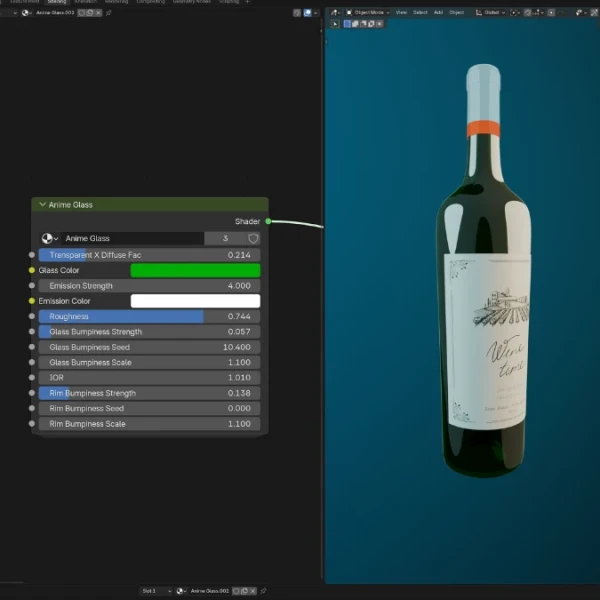
The gallery shows the material on the included glassware against a blue backdrop, and the node group in the Shader Editor. The scene is set up for Eevee with three colored point lights, Line Art outlines and a compositor with glare, vignette and sensor noise.
⚠️Made for Eevee: the toon highlights come from Shader to RGB nodes, which only work in Eevee. In Cycles the material won’t look like the gallery.
Features:
- One Anime Glass node group with all the controls
- Transparent X Diffuse Fac: 0 is fully see-through glass and 1 is solid toon shading (0.21 by default)
- Glass Color to tint the transparent part
- Toon highlights from a Glossy BSDF stepped by a Color Ramp, with Emission Color and Emission Strength for their color and brightness, and Roughness for their size
- A hard Fresnel rim, with IOR to set how wide it is
- Glass Bumpiness and Rim Bumpiness, each with Strength, Seed and Scale, to break up the highlights and the rim
How to use it:
- Use File > Append > Material > Anime Glass, or append the models with File > Append > Object.
- Render in Eevee. The materials use the Blended render method (Material Properties > Settings), as in the file.
- Lower Transparent X Diffuse Fac for clearer glass, or raise it for a more solid, painted look.
- For colored glass, duplicate the material and change Glass Color, like the dark red wine bottle in the file.
- The Line Art object draws outlines for the whole scene. Hide it if you want the glass without outlines.
Perfect for:
- Toon and anime-style renders
- Bottles, glasses and windows in NPR scenes
- Stylized product shots
- Stylized VFX and motion graphics
For realistic see-through material, try Procedural Ice.
Included Files:
- Blender project (.blend) with the Anime Glass material and node group
- Models: a wine bottle with its cap and label, a wine glass with wine, a shot glass and a glass bowl
- An Eevee scene with a camera, three point lights, a backdrop wall, Line Art outlines and a compositor setup
- Created in Blender 5.0
Watch the video tutorial: How to Make Anime-Style Glass in Blender (Eevee Shader Tutorial).