


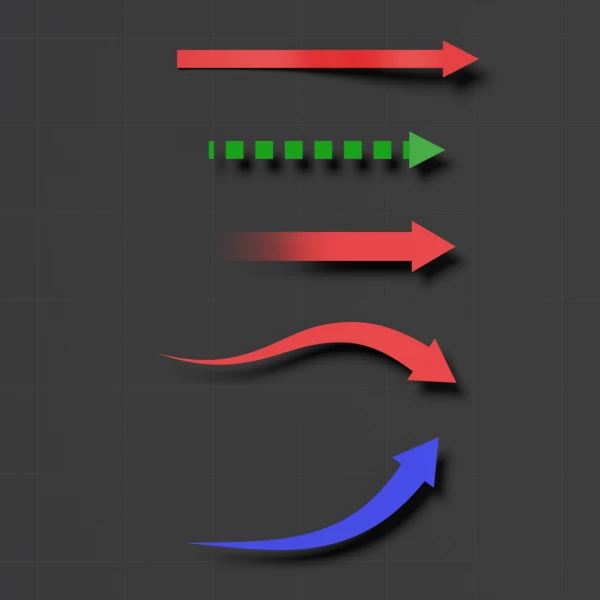


A customizable animated arrow built with Geometry Nodes
Draw a path, press play, and the arrow grows along it. This project turns any curve into a solid 3D arrow with a single Geometry Nodes modifier, so you can make map routes, growing chart arrows and motion graphics without modeling anything by hand.
The file includes five ready-made example arrows, each with its own 40-frame grow animation and material: blue, green, green dashed, red and a red gradient.
Features:
- One “Animated Arrow” Geometry Nodes modifier that works on Bezier curves
- Animation Value slider (0 to 1) with a Grow with Animation toggle, so one keyframe pair animates the whole arrow
- Separate controls for shaft thickness and shape, arrowhead height, arrowhead bottom width and arrowhead offset
- Shaft Material and Arrowhead Material slots, so the head and shaft can use different materials
- General Scale and a Shade Smooth toggle
- Real 3D thickness, so arrows cast shadows and catch light
How to use it:
- Select one of the example arrows and press Tab to edit its curve, or draw a new Bezier curve and add the “Animated Arrow” node group as a Geometry Nodes modifier.
- In the Modifier properties, set a keyframe on Animation Value at 0 on your first frame and at 1 on your last frame.
- Adjust the thickness and arrowhead controls, then pick materials for the shaft and the head.
- To bring it into another project, use File > Append and pick the arrow object or the “Animated Arrow” node group.
Perfect for:
- Historical and documentary-style map animations
- Animated infographics and explainer videos
- Growing arrows on bar graphs and data visualizations
- Flowcharts, sports plays and motion design
Included files:
- Blender project (.blend), created in Blender 5.1
- 5 example arrows with materials and animation
Tutorial: